Squarespace Nonprofit Discount: What You Get (and Don't)
You've been told Squarespace offers a nonprofit discount. So you went looking for it, and the answer was vague. Maybe a 10% code, maybe a partner program, maybe some hidden tier for verified charities. Most articles online oversell it.
Here's the full picture. Short, honest, and based on what we see when we build Squarespace sites for nonprofits across the US and Canada.
You'll learn what the Squarespace nonprofit discount actually is, how to use it, what to watch for, and the smarter savings most posts don't mention.
The short answer
The Squarespace nonprofit discount is one promo code: NONPROFIT.
You enter it at checkout. You get 10% off your first payment. That's it.
There's no deep, ongoing nonprofit rate. No verified 501(c)(3) tier that quietly halves your bill. No special plan reserved for charities. Anyone telling you otherwise is selling you a Stripe alternative.
The good news: the discount isn't the main money saver anyway. The plan you pick, the way you pay, and who you hire to build the site matter more. We'll get to all three.
How to use the NONPROFIT code
This part is easy.
When you check out for a Squarespace plan, type NONPROFIT in the promo code field. You'll see 10% come off your first payment.
A few things to know:
It works on any paid plan
It applies to your first billing period only
It does not stack with most other promo codes
After your first renewal, you pay full price
If you pay annually, that 10% comes off your full first year, which makes it worth the two seconds it takes to enter.
If you pay monthly, the savings vanish fast. You get 10% off month one, then full price every month after. For a nonprofit on the Business plan, that's roughly $4 saved. Not nothing, but not the deal it sounds like.
You can confirm the current discount terms on the Squarespace nonprofit solutions page before you build it into a budget.
The bigger savings most posts miss
If you stop at the NONPROFIT code, you're leaving real money on the table.
Most articles focus on the Squarespace promo because it's easy to write about. The actual cost of a nonprofit website has three layers: the subscription, the build, and the maintenance. The subscription is the smallest of the three. Saving 10% on a $16 to $52 monthly plan does not move the needle the way most blogs imply.
The bigger levers are:
Annual billing, which saves roughly 30% compared to monthly
Right-sized plan choice, which can shave $20 to $30 a month if you've overbought
Native Squarespace features instead of paid third-party tools
A designer who works in Squarespace, not against it
We'll break these down below.
Two ways to save more when you hire Studio Elias
Here's where the math gets interesting.
Studio Elias is a Squarespace Circle Platinum Member, which is the top tier of Squarespace's official designer program. One of the perks: when you build your site with us, you get 25% off your first annual Squarespace plan. That's more than double what the NONPROFIT promo code gives you on the subscription side.
On top of that, we offer 10% off all Studio Elias design packages for nonprofits. That covers custom Squarespace builds, landing pages, and ongoing maintenance retainers.
Stacked together, that's two real discounts:
25% off your first annual Squarespace subscription (Circle Platinum perk, applied when we set up your site)
10% off your full Studio Elias design package (nonprofit policy, applied to your quote)
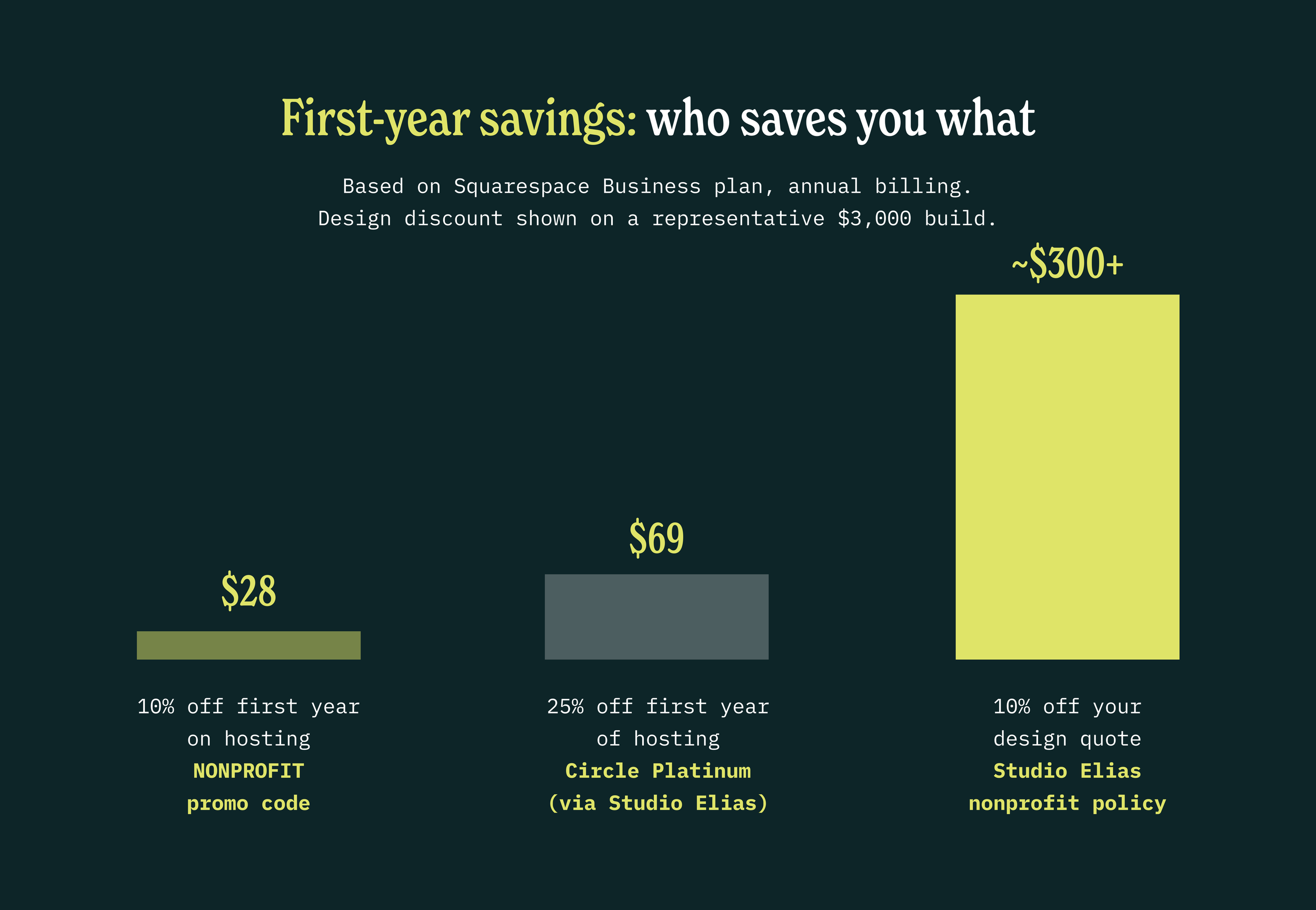
The 25% Circle discount applies to your first annual subscription only. It doesn't stack with the NONPROFIT promo code, but you'd never want it to. 25% wins.
To unlock both, mention your nonprofit status when you book a free consultation. We'll verify your charitable registration, apply the 25% to your Squarespace setup, and take 10% off your design quote.
It's a small thing on our side. It's a meaningful thing on yours.
Smarter ways to save on a Squarespace nonprofit site
This is the part most articles skip. The Squarespace discount is real but small. The bigger savings come from how you set up the site itself.
Pay annually. Squarespace gives roughly 30% off when you pay for a year up front instead of month to month. On the Business plan, that's about $11 a month saved. Over three years, it dwarfs the 10% discount.
Pick the right plan, not the fanciest one. Most small nonprofits don't need the Advanced Commerce plan. The Business plan handles donations, forms, and events for almost every small org. If you're not selling products, the Personal plan can work for very small charities. Don't pay for features you'll never use.
Use Donation Blocks before reaching for a third-party tool. Squarespace's built-in donation feature accepts one-time and recurring gifts through Stripe. The processing fee is the standard 2.9% plus $0.30. Tools like Donorbox, Givebutter, and Zeffy can be better for high-volume orgs or specific needs. But for nonprofits raising under $50k a year online, the built-in tool is usually enough. The Squarespace donation block documentation walks you through setup.
Skip the custom code unless you actually need it. Squarespace 7.1 templates can be customized through the native editor for free. Custom CSS, code injection, and developer work cost money. If you're tight on budget, start with what's in the box.
Use a designer who works in Squarespace, not against it. Hiring a designer who fights the platform inflates your build cost. A Squarespace-native designer ships faster and leaves you with a site you can actually update yourself.
If you want a sense of what an honest budget looks like, we break it down in our guide to Squarespace website costs.
When the discount makes a real difference
For most small nonprofits, the NONPROFIT promo code is a footnote. The bigger picture is total cost of ownership: plan choice, billing frequency, build cost, and whether the site you launch actually converts donors.
The promo code matters more when:
You're paying annually anyway, so 10% off year one is a real number
You're stacking savings with a separate Stripe nonprofit rate (you can apply for Stripe's nonprofit pricing separately)
You're going to use Squarespace regardless, so you might as well take the small win
The promo code matters less when:
You're paying monthly
You're on the Personal plan, where 10% is small
You're already getting bulk savings from annual billing
The honest play: use the NONPROFIT code on your first checkout. Pay annually. Pick the right plan. Then put the energy you'd spend chasing extra savings into your donation page, where the real money lives.
If you want help making the rest of your site work harder for donors, our custom Squarespace web design service is built for exactly that. And if you want to see what a strong nonprofit site looks like, browse our portfolio.
FAQ
Is there a free Squarespace plan for nonprofits?
No. Squarespace does not offer a free plan for nonprofits or anyone else. There's a 14-day trial. After that, you'll pay a subscription. The NONPROFIT promo code is the only official Squarespace discount.
Does the Squarespace nonprofit discount renew every year?
No. The 10% off applies to your first payment only. After your first renewal, you pay full price.
Does the NONPROFIT code work on domain renewals?
The promo code applies to the website subscription, not the domain. Squarespace domains renew at standard pricing.
Does Studio Elias offer a nonprofit discount?
Yes, two of them. As a Squarespace Circle Platinum Member, we can apply 25% off your first annual Squarespace plan when you build with us. On top of that, we offer 10% off all Studio Elias design packages for nonprofits. Mention your nonprofit status when you book a consultation and we'll apply both.
How does the Circle Platinum 25% discount work?
Squarespace Circle is the official designer program. Platinum is the top tier. When you build your site with a Circle Platinum designer like Studio Elias, you qualify for 25% off your first annual Squarespace plan. We apply it during site setup. It's bigger than the NONPROFIT code and doesn't require a separate verification step on Squarespace's side.
Should I use Squarespace's Donation Block or a third-party tool like Donorbox?
Start with the Donation Block if you're new and raising under $50k a year online. Switch to a third-party tool when. you need features like peer-to-peer fundraising, donor management, or lower processing fees. Don't add complexity you don't need yet.
The bottom line
The Squarespace nonprofit discount is real but smaller than the internet makes it sound. Use the NONPROFIT code if you're going it alone. Pay annually. Pick the right plan. That's the playbook.
If you're hiring help to build it, the math gets much better. As a Squarespace Circle Platinum Member, Studio Elias can get you 25% off your first annual Squarespace plan, plus 10% off our design package as a nonprofit.
Book a free consultation and we'll walk you through it. Mention your nonprofit status and we'll stack both discounts on your quote.